The Mumble AI Mac app is being redesigned. These guides describe the previous
version and will be updated when the new app ships.
What’s the difference
Cloud Mode runs on our servers. You get the fastest processing, the highest accuracy, and support for 40+ languages. Audio is encrypted in transit and at rest, and is never stored after processing. Local Mode runs entirely on your Mac. Nothing leaves your device. Recording, transcription, AI Notes, and quick format templates all happen on-device. Works offline.What runs locally
Local Mode covers Mumble’s core capture and notes:
For Meetings, Voice Notes, and Dictation, Local Mode handles the full pipeline on your Mac, from audio capture to structured notes. Customized templates, Voice Skills, and AI Chat are Cloud only today.
Meetings is the clearest example: recording, transcript, and AI summary all run on-device. You can take a meeting on a plane or in a secure room with no internet, and nothing about it (audio, transcript, or summary) ever leaves your Mac.
How to choose
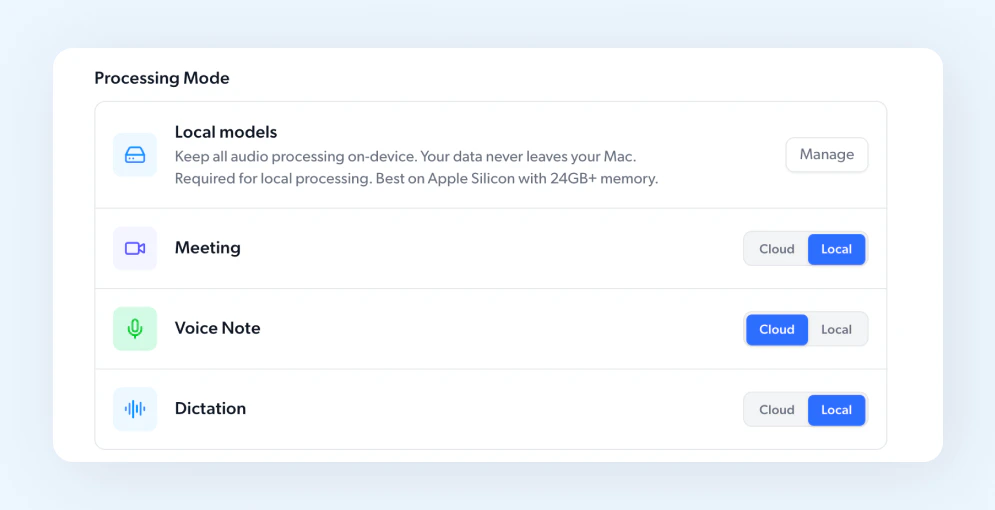
You don’t have to pick one mode for everything. Each feature has its own toggle in Settings > Processing Mode. A simple way to think about it:- Cloud for everyday meetings and notes where you want the fastest results and broadest language coverage.
- Local for sensitive conversations, regulated work, or anytime you want a clear privacy line. Also useful when you’re offline.
Requirements for Local Mode
- Apple Silicon Mac (M-series)
- macOS 15 or later
- 24GB unified memory or more recommended
- One-time model download (about a few GB, done during onboarding or from Settings > Processing Mode)
Set it per feature
Open Settings > Processing Mode. Each feature has its own Cloud and Local toggle. Switch anytime.